The spritesheet editor has been completed and is now a working tool. Now to start work on the animation editor which will read the output and use it to populate animations. The XNA code to read the XML and draw the image portions will sit between graphics and animation. I'll be writing this sprite rendering code in Java first however because it will be used for rendering everything in the tool from now on (as well as potentially running inside applets on a sprite sharing website I have grand ideas for but too little time to make happen) , then porting to C# and C++.
Here is a small example of the spritesheet output:
Wednesday, 28 October 2009

Tuesday, 20 October 2009
Spritage
I have been mad mad busy at work but things have quieted down somewhat so I'm back to this spritepage / animation editor. It's really not a huge job, it's just a case of finding the time to finish it. Anyway I'm quite drunk so don't intend to make a big rambling post but wanted to share a screenshot, as a wee update and proof I haven't been sat with my thumb up my arse. I present to you... SQUINKER BETA v0.00001
Update: Bit of explanation- this is the spritepage editor, the precursor to the animation tool. It is simply for defining sprite areas on an image and will shortly provide image optmisation. As you can see it will make it very simple to import sprites by name into both the animation tool and the game itself and stops you having to directly manipulate images and filenames repeatedly. The idea is to encapsulate image data away from the code itself, provide high-level, language-independent access to sprites and animations, and to provide a GUI for complete customisation of graphical content without having to open either your IDE or a drawing package!
Imagine for the sake of example that you wanted the missile below to fly out of and circle the big weird-looking mechanical thing (this is not a great example because missiles would almost certainly be an interacting entity, but pretend that they are purely visual- perhaps some electric orbs or something would be more fitting), and at the same time the big mecha thing would be animating like so: Img1 for 2 frames, Img2 for 1 frame... ad infititum (as would the missile). Without the editor there are 2 ways of doing this- coding it, or physically creating lots of almost identical frames of the same size in a graphical tool, and looping them. Both approaches are tedious at best and wasteful at worst. With Squinker, each 'element' will never be replicated and the only data required by the game is an image and some XML data. What's more, someone with no coding experience can mess with animations and immediately see the results in-game. We could have mad complex animations with zero additional time cost.


Sunday, 27 September 2009
Moving stuff over to new entity system
Yesterday I got the monster/projectile collision stuff moved over to the new entity system. I took the existing tests that me and Sam did and rejigged them. Pathfinding has also been taken over.
Unit testing each action was fairly easy, but doesn't give you much confidence that the entire interaction will work - pathfinding and shooting both involve a few different components talking to each other. To fully test this I've added some integration tests. They still run as fast as the unit tests, but they involve interactions between several classes (which should be a no-no in a unit test).
There are still a few tests that need to be added, or rather there are still things we need to work out. At the moment each action checks its user and target entities for certain components. If they exist it proceeds as normal. If it can't find them however, it just returns from its DoAction method. We'll need to think about cases where actions can act on entities that have a subset of the components they require to work fully, and what should happen when one or several can't be found.
Are both of you up for a chat later on this afternoon? Thinking about 1700 onwards...?
Unit testing each action was fairly easy, but doesn't give you much confidence that the entire interaction will work - pathfinding and shooting both involve a few different components talking to each other. To fully test this I've added some integration tests. They still run as fast as the unit tests, but they involve interactions between several classes (which should be a no-no in a unit test).
There are still a few tests that need to be added, or rather there are still things we need to work out. At the moment each action checks its user and target entities for certain components. If they exist it proceeds as normal. If it can't find them however, it just returns from its DoAction method. We'll need to think about cases where actions can act on entities that have a subset of the components they require to work fully, and what should happen when one or several can't be found.
Are both of you up for a chat later on this afternoon? Thinking about 1700 onwards...?
Sunday, 20 September 2009
Mocking Texture2D/SpriteBatch/Content
I've run into a problem.
For constructors for certain things, like the Monster factory, I'd like to add a list of Texture2Ds loaded at startup so that each factory method can give the entity the correct sprite.
However.
To mock a class (which has an implementation) rather than in interface (where the mock provides the entire implementation) you need to mock out everything that goes into its constructor. When you look at Texture2D or SpriteBatch, you'll see they take a GraphicsDevice which itself takes loads of stuff. The object graph explodes.
There does seem to be a way around this - someone's written a test framework called Scurvy.Test which purports to solve these kinds of problems by allowing you to instantiate the whole XNA thing during tests including the ContentManager, which would let us load Texture2Ds.
The other way I can think to deal with it is to abstract the graphics stuff away, dealing with some wrapper or other rather than relying on XNA's built in types.
Either way the unit tests aren't going to be as straightforward as I'd hoped.
For constructors for certain things, like the Monster factory, I'd like to add a list of Texture2Ds loaded at startup so that each factory method can give the entity the correct sprite.
However.
To mock a class (which has an implementation) rather than in interface (where the mock provides the entire implementation) you need to mock out everything that goes into its constructor. When you look at Texture2D or SpriteBatch, you'll see they take a GraphicsDevice which itself takes loads of stuff. The object graph explodes.
There does seem to be a way around this - someone's written a test framework called Scurvy.Test which purports to solve these kinds of problems by allowing you to instantiate the whole XNA thing during tests including the ContentManager, which would let us load Texture2Ds.
The other way I can think to deal with it is to abstract the graphics stuff away, dealing with some wrapper or other rather than relying on XNA's built in types.
Either way the unit tests aren't going to be as straightforward as I'd hoped.
Component-based entities II - The Wreckoning
I've made a start at implementing the system detailed in the last link. The diagram from the article sucks the boaby, so I've re-done it using YUML (a free, online UML editor - where you draw your UML using code!):
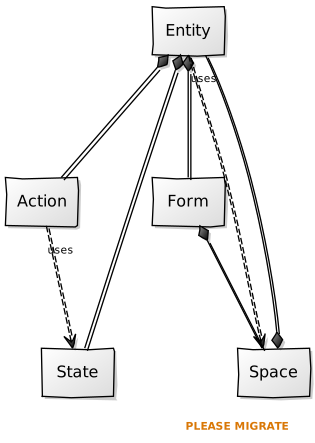 This says
[Entity]++-[Action]
[Entity]++-[State]
[Entity]++-[Form]
[Entity]uses-.->[Space]
[Form]++-[Space]
[Space]++-[Entity]
[Action]uses-.->[State]
- Entity is composed of Form, Action and State
- Form is composed of Space
- Entity uses Space
- Action uses State
[Entity]++-[Action]
[Entity]++-[State]
[Entity]++-[Form]
[Entity]uses-.->[Space]
[Form]++-[Space]
[Space]++-[Entity]
[Action]uses-.->[State]
Thursday, 17 September 2009
Component-based entities

(Sam, you were right - the blog is a good guilt-causing mechanism. I've not done any coding since before pyweek!)
At the moment I'm reading up on component-based entity systems. It seems like a much more flexible approach than the one we took initially. When you want to add some functionality it goes in as a standalone component, rather than being wedged into a possibly inappropriate place in the class hierarchy.
- This is a good post from a dude that worked on the Tony Hawks games discussing his experience refactoring their whole engine to use component-based entities. Pretty light on code though :(
- This other article discusses Dungeon Siege's system. They seem to have a mad hybrid going on. They have components, but they also have 'template' game objects which are like common archetypes. The components themselves seem to have some hierarchy going on: "The Attack component handles loading and launching ammo for projectile weapons. Requires the Common component. ".
- This one has some actual code but it's pretty bare-bones. It does match the way I'm thinking about it though, which is that an Entity is nothing but a collection of Components.
- Yet another one goes a slightly different route again. He's broken down all game objects into five classes - Entity, Space, Form, State and Action. Form is the visual representation and also holds State. Entities hold Actions (insantiated by game events). Space is stuff like view/world frustum, used for optimisation.
Our components in this system become subclasses of Action and State. An Action operates on specific kinds of State objects (e.g. ItemPickup action interacts with Inventory state object). Here's an example from the article:- "Let’s say the car is a fast car and we want to make it go even faster. However, what we do not want to do is make the car faster. If we were to make the car faster, we could only affect the behavior of that car. Instead, we make the "fast" faster, and therefore ANY game token car that can go "fast" can be affected if we so choose. Much more importantly, not only could any token representing a car be affected, also, ANY game token with a "fast" behavior could potentially be modified regardless of what it is meant to represent."
I'm going to have a go at implementing the last one, starting with something pretty simple so we can get back to having monsters and bullets collide as quickly as possible. As always, let's hear your thoughts :)
Sunday, 6 September 2009
Pyweek's finished!
 And here's our game
It came out pretty well for a week's effort, especially considering that the vast bulk of the content was added on Saturday (and the wee hours of Friday night).
Anyway, this means I'll be back on the project now - although maybe not today. Got a lot of missed housework to catch up on :( (and I need a break :P)
Thursday, 3 September 2009
UI update
The UI layout is working really nicely and the input catching and state selection is done- it just needs to fire events, but I have yet to read about the Event model in C#. I'm figuring each button will fire an ID from an event enumerator somewhere, and this ID gets passed into its constructor. Then the UI is finished- any object that is interested should be able to subscribe to that ID.
So at the moment it is looking good, you can mouseOver or click something and it will change state and the entire set of components will be re-layed out to fit around the new state. Some of the design decisions are a compromise, I did manage to get a tidier, better encapsulated structure with less transparency in earlier revisions but the code was fucking mental and order-of-operation dependent. I'm happy with this version, the only problems being that it exposes the state (previously internalised) and also exposes some redundant properties. I spent a long time trying to find a perfect solution for this but it is way beyond the scope of this game.
What remains to be done in the UI is animation- specifically tweening between states. This should be very easy to implement and means any menu should be able to intrinsically animate its state changes with zero additional code- a cool side effect of the design. I'll probably mess about with this over the next couple of days while Gary is busy with pyweek.
In other news, I am going to be splitting my time between this project and an iPhone game project with Al- looking to make some cash from the AppStore gold-rush. Don't have a mac yet but we will be writing the game engine under windows with C++ / OpenGL-ES and doing the minimal porting required to get it running on a phone later on. It's a big job- I made a solo attempt a few months back and got as far as loading PNG files into textures. The foundational work required is pretty hefty but the potential rewards are great, and I don't see the iPhone going anywhere for a while.
So at the moment it is looking good, you can mouseOver or click something and it will change state and the entire set of components will be re-layed out to fit around the new state. Some of the design decisions are a compromise, I did manage to get a tidier, better encapsulated structure with less transparency in earlier revisions but the code was fucking mental and order-of-operation dependent. I'm happy with this version, the only problems being that it exposes the state (previously internalised) and also exposes some redundant properties. I spent a long time trying to find a perfect solution for this but it is way beyond the scope of this game.
What remains to be done in the UI is animation- specifically tweening between states. This should be very easy to implement and means any menu should be able to intrinsically animate its state changes with zero additional code- a cool side effect of the design. I'll probably mess about with this over the next couple of days while Gary is busy with pyweek.
In other news, I am going to be splitting my time between this project and an iPhone game project with Al- looking to make some cash from the AppStore gold-rush. Don't have a mac yet but we will be writing the game engine under windows with C++ / OpenGL-ES and doing the minimal porting required to get it running on a phone later on. It's a big job- I made a solo attempt a few months back and got as far as loading PNG files into textures. The foundational work required is pretty hefty but the potential rewards are great, and I don't see the iPhone going anywhere for a while.
Sunday, 30 August 2009
Week off

Pyweek starts today, so I'm on holiday from the game until next Sunday.
In other news, me and Sam pair-programmed the beginnings of the Entity/collision system. We also got Monsters querying tiles for which direction they're going, and in the wee small hours I got the directions for each of the AI paths (now called Red, Green, Blue and Purple instead of 1, 2, 3 and 4) parsed out of the map file and loaded into the game. Added a debug-draw method to Tiles so we can see what's in 'em (the orange blocks are MountPoints):
Thursday, 27 August 2009
TDD/Pairing Session

I was thinking, since you guys aren't totally up to speed on the ol' testing front we could do a pair (or tri) programming session on Saturday. I'll share my screen while I TDD the fuck out of the entity manager. The other person(s) watching can be backseat programmers (not nearly as annonying as it sounds - it's ace to have someone catching your stupid mistakes as you make them).
When I've got something in a check-inable state, we can check in the code and switch who's doing the coding.
It was a screencast of someone doing just this that made TDD finally click for me, so I think it could be pretty useful.
Monday, 24 August 2009
Current Build Issues
Just thought I'd raise a few points about how we're approaching this in general, since its starting to look like a game now =D
First off, I'm getting confused by the number of files there are with multiple class/interface definitions in them. Was wondering if this was a temporary measure or the way you guys want do it. I never put more than one class definition in a file unless its a private class (which is rare as-is). Mainly just a concern as it makes it hard to follow where things are. I have a multitude of files ready to be synched, but I can't integrate them properly because of said definitions for things I have that clash with what's there.
Second, and mainly - I don't want to step people's toes by rearranging stuff the way I like it, so I think it would be a good idea to have a discussion about core standards. I'll go ahead and upload what I can right now, but its going to take a bit of fiddling. I feel that a stronger approach to organisation at this stage will prevent problems from arising in the future.
Tower class structure is about 50% in place, though I've made a few assumptions at this stage about what we might need which you will see reflected in the outline implementations and interfaces. Provisions are there for upgradeable entities (towers/weapons), selectable objects (towers/monsters) and (guess work here) some kind of unified update() interface.
Regards.
First off, I'm getting confused by the number of files there are with multiple class/interface definitions in them. Was wondering if this was a temporary measure or the way you guys want do it. I never put more than one class definition in a file unless its a private class (which is rare as-is). Mainly just a concern as it makes it hard to follow where things are. I have a multitude of files ready to be synched, but I can't integrate them properly because of said definitions for things I have that clash with what's there.
Second, and mainly - I don't want to step people's toes by rearranging stuff the way I like it, so I think it would be a good idea to have a discussion about core standards. I'll go ahead and upload what I can right now, but its going to take a bit of fiddling. I feel that a stronger approach to organisation at this stage will prevent problems from arising in the future.
Tower class structure is about 50% in place, though I've made a few assumptions at this stage about what we might need which you will see reflected in the outline implementations and interfaces. Provisions are there for upgradeable entities (towers/weapons), selectable objects (towers/monsters) and (guess work here) some kind of unified update() interface.
Regards.
Sunday, 23 August 2009
My monster senses are tingling
Just committed first part of monster senses. You can now get the surrounding tiles for a given tile. Was much harder and took way longer than it should have (in the same time Sam got all the UI stuff done!)
To be fair - in doing this it made me re-think the way I was adding tiles to the world. Instead of keying them by grid square when they're added, I just made a method that gives you the grid co-ordinates (i.e. the top left corner of the tile) for a given screen co-ordinate.
We should be able to get onto some interesting, gameplay-like stuff pretty soon :)
To be fair - in doing this it made me re-think the way I was adding tiles to the world. Instead of keying them by grid square when they're added, I just made a method that gives you the grid co-ordinates (i.e. the top left corner of the tile) for a given screen co-ordinate.
We should be able to get onto some interesting, gameplay-like stuff pretty soon :)
UI rendering updated


Was supposed to look at input today but got sort of sidetracked. Anyway the UI rendering now suports alignment, transparency, strings, background images on containers and empty space atomics.
Menu rendering system beta
 Today I got a Swing-ish menu system for the game sort-of working. It's just the rendering (minus animation) at the moment. Above you can see a VerticalFlowLayout container holding three HorizontalFlowLayout containers, each holding a few 'atomic' elements, in this case images. String support is more-or-less implemented but I couldn't be fucked dealing with wrapping at 1am so I had a beer and a banana instead (undecided about that triple-filtered Stella- it's not bad).
The nice thing about the system is that it is recursive and will trigger a full re-layout every time you add a new element, and automagically stretch to fit them as they are added. Padding and borders are supported at every level.
I didn't use TDD- I wasn't sure how I would do a test for a menu system or how much I should presume to get done, whether I should write tests for animation or not, etc. When it came to the point where I assumed the implementation was complete, I went to build my menu and realised I didn't have a clear idea how I was going to use it, and ended up making a good few changes- so now I definitely see the advantage in TDD! With TDD I would have thought about this from the start. I'm still not sure how to go about testing something so visual, to be honest.
So anyway, it remains to include input response, button states, and potentially animation. Oh, and background images. Thinking about it, I don't know why the fuck I have the concept of 'atomic' elements- they should all be potential containers, then background images would be supported intrinsically. Probably a simple change. Oh well, it's late.
Thursday, 20 August 2009
First Screenshot

Not sure what should be passed into World's constructor now. It would be easy to give it a reference to Map, which has the tile width/height and number of tiles. This means a fake map has to be constructed in the tests (not much of a big deal).
The alternative is to extract each of the things World needs from Map and pass them in in the constructor directly.
Comments on a postcard.
Wednesday, 19 August 2009
Levelling up
Been working on the level implementation. Was originally going to work out paths dynamically using some mad pathfinding algorithm. But then I thought, it's tile based, let's just use tiles for AI paths. So I did.
You can have up to four different paths - as described on the wiki here: http://code.google.com/p/gntowerdefence/wiki/LevelDesign
There's no code to parse these AI paths yet (there was no original requirement for them). I'm thinking either you have a 'Directions[aiPath].Direction' property on a Tile object which the monsters query, or you have a completely separate collection of AiPath objects... open to suggestions :)
Here's a screenshot - blue: start; purple: goal; red: mountpoint; green: path; arrows: aipaths
You can have up to four different paths - as described on the wiki here: http://code.google.com/p/gntowerdefence/wiki/LevelDesign
There's no code to parse these AI paths yet (there was no original requirement for them). I'm thinking either you have a 'Directions[aiPath].Direction' property on a Tile object which the monsters query, or you have a completely separate collection of AiPath objects... open to suggestions :)
Here's a screenshot - blue: start; purple: goal; red: mountpoint; green: path; arrows: aipaths

First commit of game project
Did a few solid hours of TDD last night to get the bare bones of the game in place. So far there's adding/removing towers, and the logic for monsters entering/leaving tiles. That includes the Goal tile, and there's a GameOver event fired when the Goal runs out of points.
The way I imagined monster movement working last night was: every time they move a certain distance they fire a MonsterMoved event. The World is listening for these events. When it detects that a monster has moved over a tile boundary, it fires a MonsterChangedTile event. All the tiles are listening for these, and it allows them to keep a list of monsters they contain (especially important for the Goal tile).
This initially seemed wasteful to me - it's a lot of events - but then I thought "computers are fast as fuck", and ignored myself. I'd like to use the philosophy of naive implementation, only optimising where it's painfully obvious or actually costing us CPU.
(Thinking about it now, World should know which tile the monster has moved into, and message it directly - ah well, the events haven't actually been implemented yet so it's an easy change.)
Doing the tests first was pretty helpful - your code starts off being useable - it has to be so you can test it. It does seem quite slow going at first, but you have a certain level of confidence in your code afterwards that you don't get otherwise. Definitely recommend you guys give it a shot. Give me a shout if you need a hand with the mocking framework or the minutiae of NUnit.
The way I imagined monster movement working last night was: every time they move a certain distance they fire a MonsterMoved event. The World is listening for these events. When it detects that a monster has moved over a tile boundary, it fires a MonsterChangedTile event. All the tiles are listening for these, and it allows them to keep a list of monsters they contain (especially important for the Goal tile).
This initially seemed wasteful to me - it's a lot of events - but then I thought "computers are fast as fuck", and ignored myself. I'd like to use the philosophy of naive implementation, only optimising where it's painfully obvious or actually costing us CPU.
(Thinking about it now, World should know which tile the monster has moved into, and message it directly - ah well, the events haven't actually been implemented yet so it's an easy change.)
Doing the tests first was pretty helpful - your code starts off being useable - it has to be so you can test it. It does seem quite slow going at first, but you have a certain level of confidence in your code afterwards that you don't get otherwise. Definitely recommend you guys give it a shot. Give me a shout if you need a hand with the mocking framework or the minutiae of NUnit.
Tuesday, 18 August 2009
Particle engine beta finished

To familiarise myself with XNA and C# I wrote a little particle engine that can be plugged into the game later on for some neat effects. I had trouble with getting the effect to rotate as a whole but will leave it alone until we are at a point where we can consider using it.
Game Concept
The game description courtesy of Gary:
As far as the game goes, it's a basic tile based tower defence game. The tiles are going to be: start point, end point, path, or mount point (which you build turrets on). The baddies will come in waves from the start point, and you lose a point everytime one gets to the end point. Game's over when all the waves are finished or you run out of points.
You stop the baddies getting to the end by building towers. There will be a few kinds of tower - machine guns, flamethrowers, the usual. Towers can be bought or upgraded for credits which you earn when you kill baddies. There will be a small level of direct user involvement (these games are really meant to be strategy games rather than action games). For example - as in Ninjatown - you'll be able to change the targetting behaviour of your turrets to target the strongest/weakest/flying enemies/etc. You'll also have a weapon or two that you can directly use (when the enemies are about to get to the goal, and you're desperately trying to build turrets but can't in time) like an artillery strike that you can call in.
As far as the game goes, it's a basic tile based tower defence game. The tiles are going to be: start point, end point, path, or mount point (which you build turrets on). The baddies will come in waves from the start point, and you lose a point everytime one gets to the end point. Game's over when all the waves are finished or you run out of points.
You stop the baddies getting to the end by building towers. There will be a few kinds of tower - machine guns, flamethrowers, the usual. Towers can be bought or upgraded for credits which you earn when you kill baddies. There will be a small level of direct user involvement (these games are really meant to be strategy games rather than action games). For example - as in Ninjatown - you'll be able to change the targetting behaviour of your turrets to target the strongest/weakest/flying enemies/etc. You'll also have a weapon or two that you can directly use (when the enemies are about to get to the goal, and you're desperately trying to build turrets but can't in time) like an artillery strike that you can call in.
Subscribe to:
Posts (Atom)
